Spend
Everyday moneyReady to use. Cash-out («I already got cash») leaves checking right away; cash-in («I have money for mom/dad») waits for approval. Real cash stays with you at home.

Schools don't teach them money - you can. Oshik gives kids real practice: allowance, chores, or saving for a fun day out - even without cash. Spend wisely, wait for a parent bonus, and see how markets move - with a chat that explains without moving money.
You handle the real money at home. Oshik builds the habit.
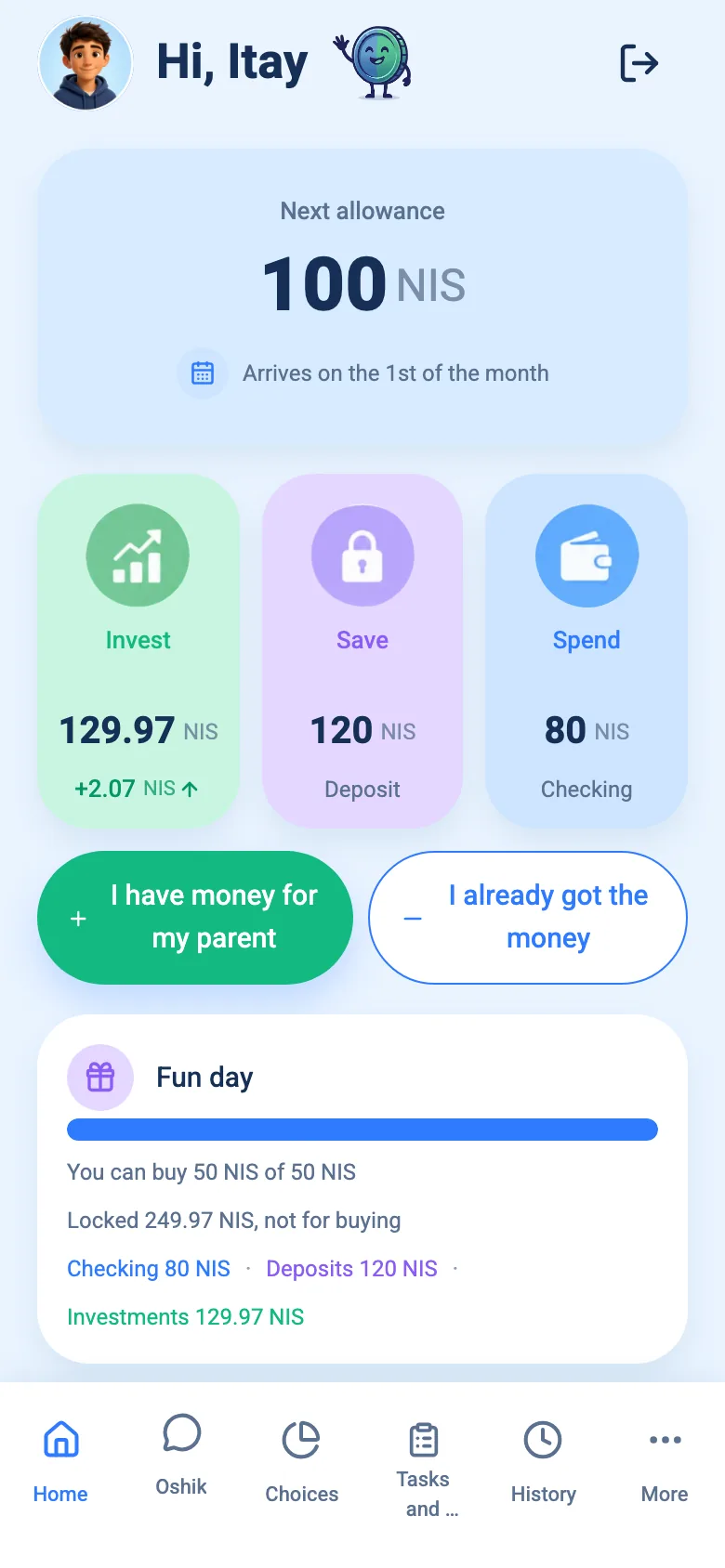
Oshik is a family money journal for kids. Allowance, chores, or saving for a fun day out - even without cash. Every bit goes to Spend, Save, or Invest. There's also a chat that explains and suggests, without moving money on its own.
Nobody taught me money when I was a kid. Not at school, and not really at home either.
I built Oshik so kids can practice money decisions at home, safely, before the world teaches them the hard way.
Instead of pocket money disappearing - every bit of allowance has a clear purpose: spend, save, or invest. Kids choose; parents set the guardrails.
Ready to use. Cash-out («I already got cash») leaves checking right away; cash-in («I have money for mom/dad») waits for approval. Real cash stays with you at home.
Lock money for a month (or the period you choose). At the end, kids get a bonus from mom or dad - for waiting.
TA-35, S&P 500 and more - see markets move up and down, with no trading and no real money at risk.
Three flexible ways to practice - tailored to how your family operates:
Weekly or monthly with an allocation ritual. You can also set it to $0 to skip fixed allowance completely.
Parents set tasks and amounts in the journal. Kids tap «Done», and funds enter checking only after parent approval.
Add funds anytime in the ledger - birthday gifts from grandparents, special rewards, or cash deposited with you.
One family, two paired interfaces. Android is on Google Play.
Set allowances, caps, and deposit terms. The family account is managed by the parent.
No separate email accounts or social logins. Fast pairing code from parent device.
Children choose how to divide money between spending, saving, and investing. Cash stays with you.


Kids build confident decision habits. Parents maintain oversight and fund commitments.


An educational chat for kids - explains, suggests an action, and never moves money without approval.

A closed educational ledger providing hands-on literacy without youth debit card risks or spreadsheet headaches. Detail in the youth card vs journal guide.
| Feature | Oshik (Family Journal) | Youth Debit Cards & Banks | Cash Jars & Spreadsheets |
|---|---|---|---|
| Financial Safety | Zero risk - no bank account links | Risk of card loss, scams, overspending | No bank risk, but cash is easily lost |
| 3 Structured Tracks | Visual: Spend, Save, Invest | Typically checking balance only | Requires manual physical sorting |
| Index Fund Simulation | TA-35, S&P 500, Nasdaq-100, MSCI World | No investing or speculative trading | Not available |
| Bonus for waiting | Parent decides and pays from their pocket | Tiny bank interest, if any | No built-in reason to wait |
| Paired Family Interface | Pair via QR or code in 10 seconds | Lengthy ID verification & bank branch visits | No child interface |
| Pricing & Privacy | Free in preview, no data selling | Monthly subscription & card fee charges | Free, but lacks engagement for kids |
Answers to questions people already search, even before the apps are in the stores.
Starting ranges, weekly vs monthly, and what the money should cover.
Spend, Save, Invest: how to start at home with no card and no bank.
When a debit card makes sense, and when a closed ledger is enough.
How much you give for waiting - without copying a bank rate.
Basic jobs unpaid; steady allowance; separate pay for extra work.
Empathy without a bailout: how to talk, when to advance, when to wait.
What age to talk about market indices, and how to explain ups and downs in a simulation.
Everything you need to know about Oshik's educational principles, child privacy, and parental oversight.
Oshik is a family money journal for kids. Not a bank and not a card - real cash stays with you at home. Kids practice spending, saving, and investing with no risk.
No. No bank link and no card. Cash or transfers stay between you and your kids, matching what the journal shows.
About 6 to 16, with parents. Simple for a first allowance, deep enough for teens who want indexes and a bonus for waiting.
Every shekel goes one of three ways: Spend (ready to use), Save (locked for a while, then a parent bonus), and Invest (see indexes like TA-35 and S&P 500 - no trading).
The parent. Kids lock money for a while, and at the end they get a bonus from mom or dad - not a bank yield. On Invest, kids see indexes go up and down with no trading and no real money at risk.
An educational money chat: it explains, sees balances and goals, and can suggest an action like asking a parent. The child confirms; money never moves on its own. Chat messages are used only to produce the reply - not for ads and not sold. Parents can turn chat off for the family or one child.
Free. Android is on Google Play. For iPhone, leave an email. No selling data. Kids join with a short code or QR from the parent - no public profile. Chat messages are used only to reply, not for ads.
Yes. Set allowance to zero and save toward a fun day out or a gift. Kids do chores, watch the progress bar, and learn to wait - until you redeem outside the app.
No. It's a journal only. You set the task and amount, the child taps Done, and the amount hits the journal after you approve. Real cash or a real purchase stays with you outside the app.
Not yet. The family account is managed by one parent. Support for two parents is planned and may come in a future update.
Download Oshik on Google Play. The same link works for parent and child.

Leave your email and we will tell you when it is on the App Store.
Oshik is an educational journal - not a bank, not a card, and not investment advice. Numbers in the app are a simulation. Real money moves between you and your kids outside the app.